Molecule
A desktop debugging tool built with Tauri, React, and Rust, designed to streamline high-volume validation workflows through smart session management, IPC with IPython, and per-failure SQLite artifact tracking.
Overview
Molecule is a desktop productivity and debugging tool built outside company hours to address real pain points in high-volume validation workflows. In post-silicon environments, debugging is typically done directly on a host connected to the silicon under test, but inconsistent host configurations, scattered files, and cumbersome window management across simultaneous failures all conspire to bleed time from every interaction. Molecule was designed to shave those seconds off, accumulating into a meaningfully faster debugging loop over the course of a shift.
The core philosophy is minimal interaction for maximum clarity: abstract away unnecessary complexity so that both seasoned engineers and newcomers can focus on the actual work of debugging, not the scaffolding around it.
What it does
- Provides an intuitive UI that streamlines daily debugging tasks, flattening the learning curve for new team members by hiding complexity behind well-considered affordances.
- Manages sessions intelligently: launches specified applications while preserving session state, and detects if a target is already running, in which case it refocuses the existing window rather than spawning a duplicate instance.
- Compartmentalizes different application instances neatly via a dedicated tab bar, supporting complex multi-failure window management without losing context between issues.
- Communicates with an external IPython kernel over a full-duplex IPC channel governed by a finite state machine, enabling seamless integration with Python-based tooling.
- Tags experimental files using a many-to-many relational model backed by per-failure SQLite databases, making specific artifacts retrievable by query rather than by navigating a sprawling folder tree.
- Automatically compresses and offloads large artifact files to geo-located datacenters, then transparently retrieves and decompresses them on demand.
Stack choices
Molecule is built on Tauri, with the user interface and frontend written in React and all app logic and system-level operations handled in Rust. Tauri was chosen because it avoids the memory overhead of bundling a full browser runtime: the result is a single executable under 20 MB with no external dependencies, portable to any host without an installation step. This matters in a post-silicon environment where hosts are not always under the engineer's control.
Frontend
React was the natural fit for a UI that is highly interactive, features dynamic content, and
requires frequent updates. To minimize unnecessary re-renders, memoization techniques including
React.memo, useMemo, and useCallback were applied throughout to cache component outputs
and functions based on their inputs. The React Compiler was also integrated into the project,
automatically analyzing component code and applying memoization and other optimizations at
build time, amplifying the gains from manual memoization with zero ongoing maintenance cost.
A second performance challenge was slow rendering on data-heavy views. The solution was to build an "illusion of responsiveness" by optimizing around total blocking time, the time taken for the interface to become interactive and display meaningful content. Rather than waiting for all data before rendering, a cascading fetch strategy was implemented using TanStack Query. Critical data for primary components is fetched first; non-critical data for hidden components and secondary menus is fetched in the background as a waterfall of requests, managed through TanStack Query's hooks and configurations. A custom Rust cache layer sits beneath this, storing fetched data so that subsequent refreshes can be served locally without a network round-trip, reducing load times and smoothing the experience during repeated interactions.
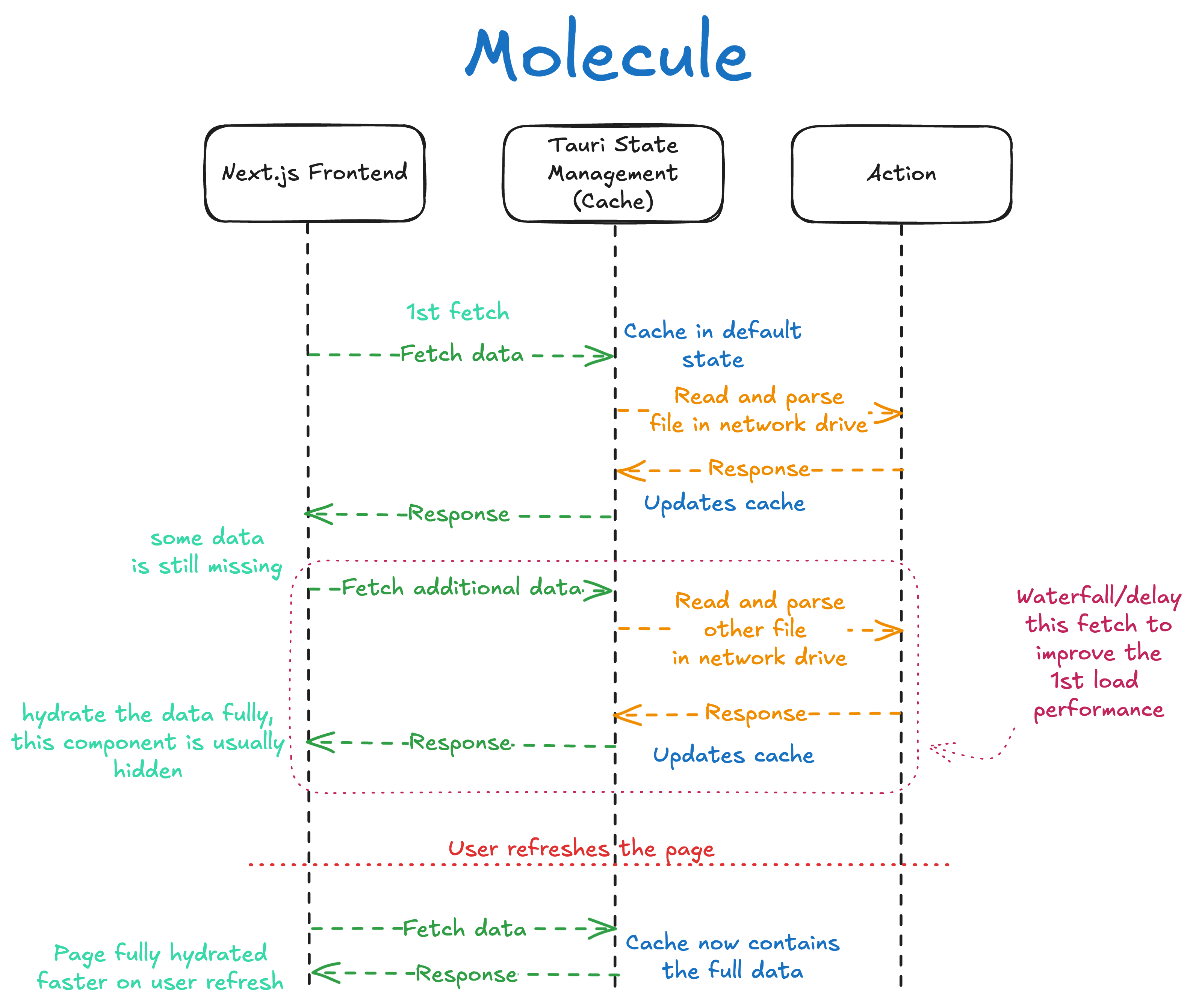 Molecule Caching Overview
App Launcher and Window Management
Window management is implemented using the windows crate in Rust, which provides a safe
and idiomatic interface to the Windows API. When a new application is launched, the system
calls FindWindowW to obtain an HWND, a unique handle for each window. Because this raw
pointer needs to be shared across asynchronous threads, it is wrapped in an AtomicPointer
and stored in Tauri's state manager, making window handles accessible to all parts of the
application without unsafe sharing.
When a user initiates an action such as opening a file, the application first checks the state
manager to determine if a related window already exists. If a match is found, ShowWindowAsync
from the windows crate brings the existing window to the foreground rather than launching a
new instance. TanStack Query then invalidates the relevant query, triggering a background
re-fetch of all related application windows and re-rendering the tab bar component to reflect
the updated desktop state. Closing all related instances is equally straightforward: the app
iterates over the stored window handles and sends a WM_CLOSE message to each via
PostMessageW. Application defaults and session configuration are managed through a TOML
file, editable both directly and through an in-app interface.
Inter-Process Communication (IPC)
IPC between Molecule and the external IPython kernel is built around a finite state machine
that manages the connection lifecycle, ensuring stability and predictable behaviour. The state
machine, implemented using Rust's enum type system, governs transitions between states
including Idle, Listening, ClientConnected, ConnectingDuplex, PipesActive,
Stopping, Stopped, and Error(String).
The transport layer uses native Windows Named Pipes, with two pipes establishing a full-duplex
channel. Internally, three distinct mpsc channels manage the flow of information without
blocking the main thread. A command_channel allows the main thread to control the IPC state
machine, initiating or terminating a connection. A state_channel propagates the current
state of the IPC thread back to the main thread, so the UI accurately reflects connection
status in real-time. Incoming messages from IPython are passed via a python_channel to a
separate message-handling thread running on the Tokio asynchronous runtime, keeping the state
machine itself unblocked during intensive data exchange.
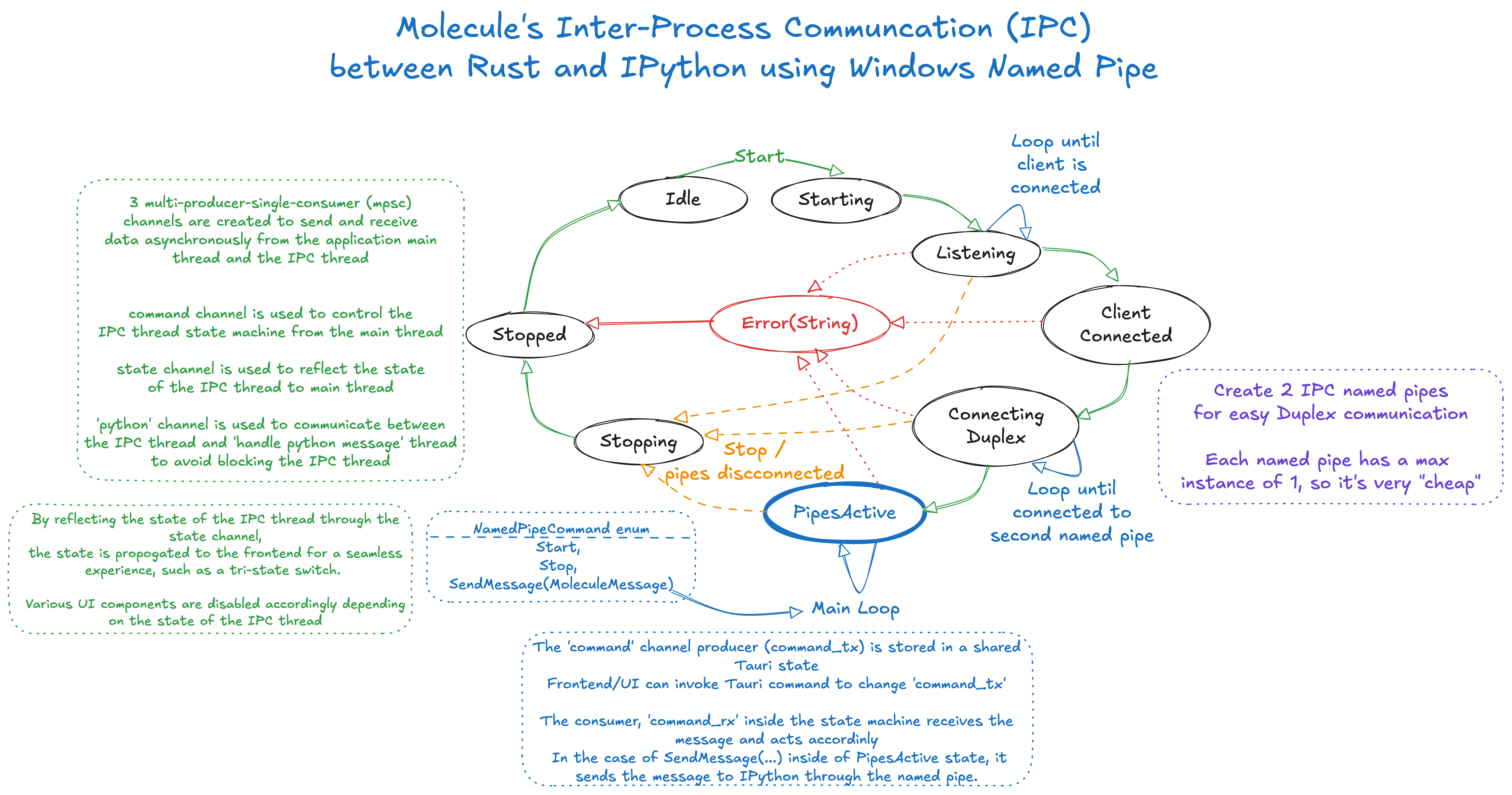 Molecule IPC Overview
File Tagging and Remote Storage
When analysing a failure, Molecule automatically creates a new SQLite database that serves as a comprehensive manifest for that investigation, encapsulating all relevant artifacts (logs, configuration snapshots, and other outputs) associated with the specific failure event. This keeps each investigation isolated and reproducible.
The schema uses a many-to-many relationship between a files table and a tags table,
managed through a file_tags junction table. This allows a debugger to query and filter
artifacts by any combination of conditions and manipulated variables without navigating a
folder hierarchy. All referenced file artifacts are treated as immutable, with the application
enforcing read-only access to guarantee investigative integrity.
For storage efficiency, large artifact files are automatically compressed and offloaded to
remote, geo-located datacenters. The per-failure SQLite database maintains references to these
files in a remote_paths table. When a debugger revisits a failure, Molecule transparently
retrieves and decompresses the relevant files to a local cache on demand, with no manual
intervention required.
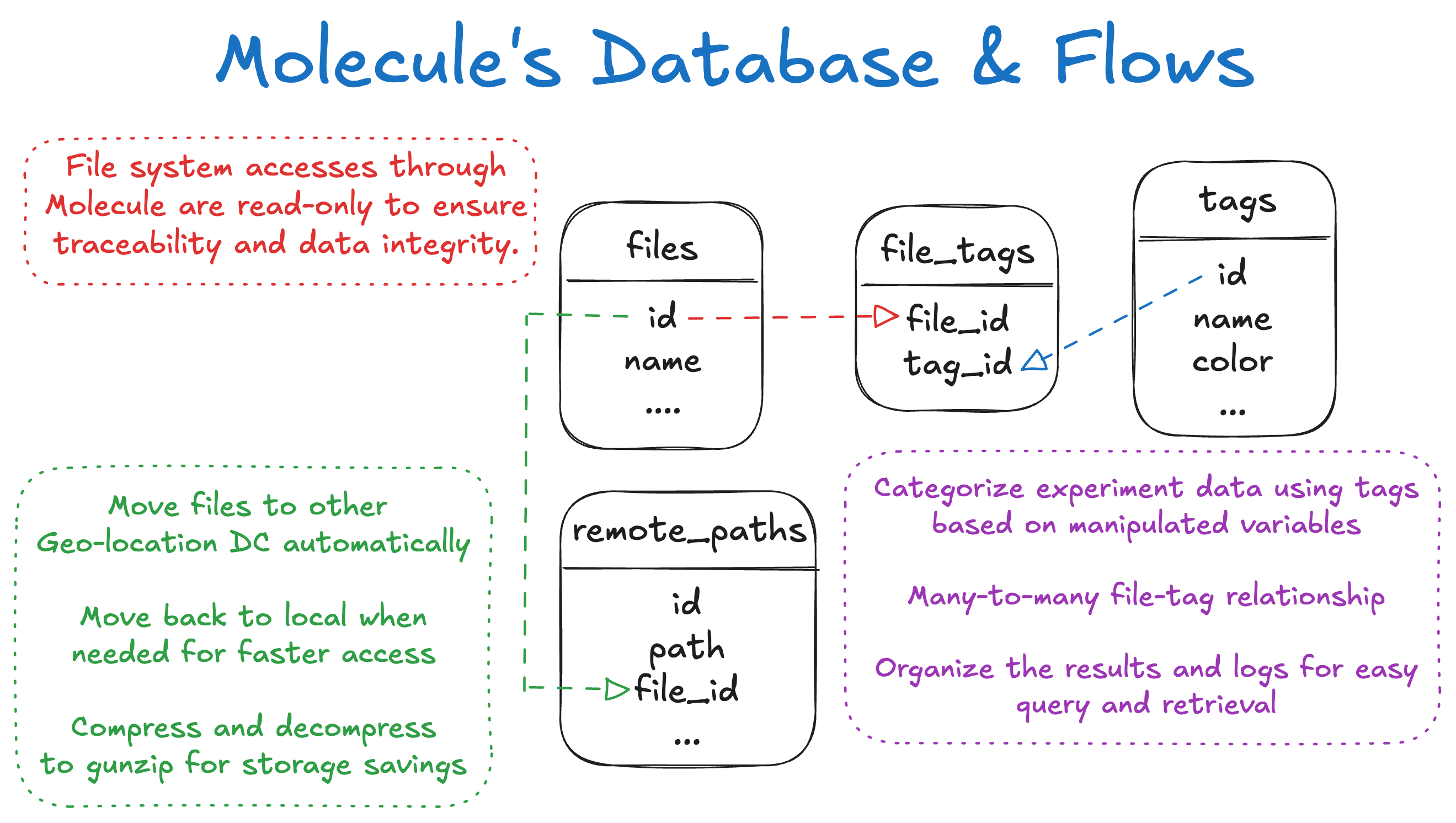 Molecule Artifact Overview
Challenges
The IPC architecture required careful design to avoid blocking the main thread during connection state transitions or high-throughput data exchange. Modelling the connection lifecycle as an explicit Rust state machine, rather than ad-hoc boolean flags, made transitions auditable and testable, and the three-channel separation (command, state, python) cleanly decoupled concerns that would have otherwise created subtle race conditions.
Window management on Windows is less predictable than the Win32 API surface implies. Determining whether a running process is the correct instance of a target application, as opposed to a background helper spawned by the same executable, required matching on window class names and process tree position rather than executable name alone. Getting this reliable across the range of tools the team uses took iteration.
The cascading fetch strategy, while effective at improving perceived responsiveness, required careful choreography of query dependencies in TanStack Query. Determining the correct waterfall ordering (which data is truly critical for the initial render versus which can safely defer) is a judgment call that changes as the UI evolves, and maintaining that ordering across component refactors is an ongoing cost.